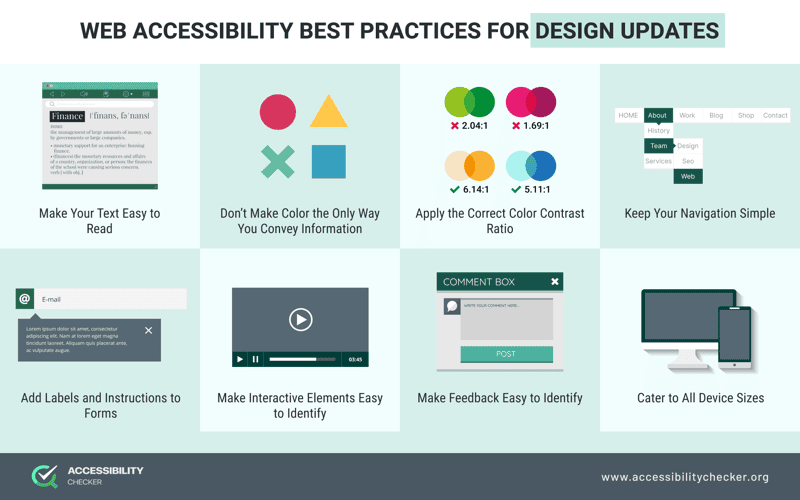
In the digital age, the importance of accessible web design cannot be overstated. With approximately 1 billion individuals globally facing various disabilities, creating accessible websites is essential for fostering equality in the online environment. Embracing principles of web accessibility not only ensures compliance with WCAG standards but also defines an inclusive design philosophy that welcomes everyone. By focusing on usability for all, we craft user experiences that resonate with diverse audiences, including those who rely on assistive technologies. Accessible web design is not simply a moral obligation; it reflects a commitment to enhancing the overall user experience and expanding our digital horizons.
When we talk about creating user-friendly digital spaces, it’s crucial to consider terms like inclusive design and usability for all. In essence, web accessibility embodies the idea that anyone—regardless of ability—should navigate online content with ease. This commitment to designing for disabilities is reflected in practices that promote WCAG compliance, ensuring our websites cater to diverse user needs. By fostering an environment where everyone feels valued and included, we not only meet legal standards but also enrich the online landscape for all users. As we delve into the world of accessible web design, we uncover the beauty of inclusivity and connection in our digital interactions.
The Essence of Web Accessibility
Web accessibility can often feel like a buzzword, yet at its core, it represents a profound commitment to inclusivity. Everyone, including individuals with disabilities, deserves to experience the digital world fully. Imagine navigating a website designed without these principles—frustrating, right? Accessible web design not only caters to diverse users but also enriches the experience for all. Just take a moment to consider the implications of excluding even a fraction of your audience. Besides, who wouldn’t want to create a space that everyone can enjoy?
To truly understand web accessibility, we must recognize it as more than just legal compliance. While statutes like the Americans with Disabilities Act provide a solid framework, the ethical implications of our designs are paramount. When we construct our digital domains to be inclusive, we unlock a wealth of perspectives, ideas, and experiences. One aspect to focus on is navigation. A well-structured site allows users—regardless of ability—to traverse its paths with ease, fostering engagement and interest.
What if every user could seamlessly interact with your website? That’s not just a dream; it’s a reality that excellent accessible web design can achieve. Beyond fulfilling regulatory demands, designing for accessibility significantly improves usability for all users. For instance, consider incorporating a color contrast ratio of at least 4.5:1 for your text against its background. This simple technique benefits those with visual impairments and also enhances readability for everyone, especially in bright environments.
Accessibility means adapting to various needs. Take your typical form submission scenario: a person with motor difficulties may struggle with tiny buttons. Here’s where you can implement larger targets using CSS. Instead of this small button design: `button { width: 60px; height: 20px; }`, consider increasing it: `button { width: 150px; height: 40px; }`. Such adjustments make a world of difference, allowing every user to interact more comfortably.
Implementing WCAG Compliance
How do we determine whether our designs stand up to accessibility standards? The Web Content Accessibility Guidelines (WCAG) offer a robust rubric for this. Adhering to these guidelines doesn’t merely scratch the surface; it encourages profound changes that enrich overall web quality. For example, using semantic HTML elements ensures that screen readers can correctly interpret the structure of the page. Rather than relying on generic `
This website uses cookies to improve your experience. AcceptRead More
Privacy & Cookies Policy
Privacy Overview
This website uses cookies to improve your experience while you navigate through the website. Out of these, the cookies that are categorized as necessary are stored on your browser as they are essential for the working of basic functionalities of the website. We also use third-party cookies that help us analyze and understand how you use this website. These cookies will be stored in your browser only with your consent. You also have the option to opt-out of these cookies. But opting out of some of these cookies may affect your browsing experience.
Necessary cookies are absolutely essential for the website to function properly. This category only includes cookies that ensures basic functionalities and security features of the website. These cookies do not store any personal information.
Any cookies that may not be particularly necessary for the website to function and is used specifically to collect user personal data via analytics, ads, other embedded contents are termed as non-necessary cookies. It is mandatory to procure user consent prior to running these cookies on your website.
Create a free account, or log in.
Gain access to read this article, join developers who build better, faster, smarter solutions
Upgrade your subscription
Get full access to all content. Join developers who build better, faster, smarter solutions