
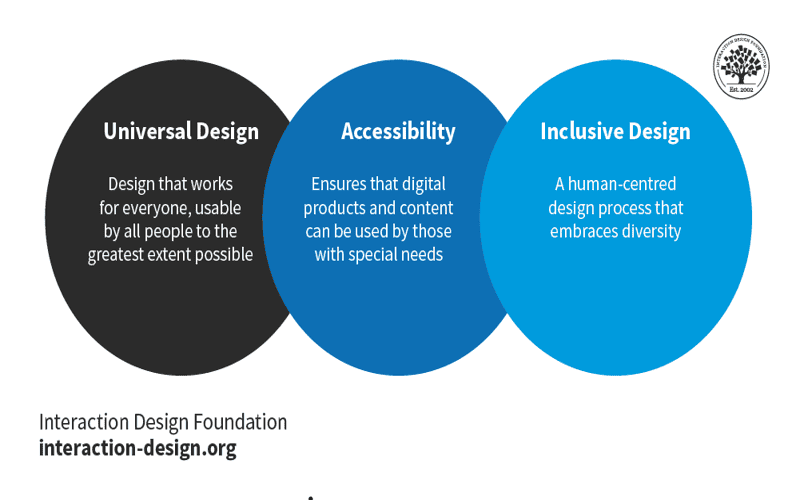
Have you ever landed on a website only to find yourself instantly lost, struggling to decipher its layout or engage with its content? This frustrating experience often stems from a lack of accessibility—an oversight that thousands of digital spaces commit daily. Designing with accessibility in mind is not merely a technical requirement; it’s about cultivating an inclusive environment where every user, regardless of ability, can seamlessly navigate and interact with your site. Embracing inclusive design principles not only enhances user satisfaction but also ensures compliance with WCAG guidelines—an essential step toward creating a truly accessible web experience.
Consider this: roughly 15% of the global population lives with some form of disability, emphasizing the need for thoughtful accessibility measures in web design. By integrating web accessibility best practices, such as ensuring robust keyboard navigation and utilizing descriptive alt text for images, you can transform your site into a welcoming haven for all visitors. This commitment to accessible web design is more than a trend; it reflects a broader understanding of user diversity and the responsibility we hold as designers to adapt to the needs of every potential user.
Enhancing Usability Through Inclusive Design
Inclusive design is more than just a glowing buzzword thrown around in tech circles; it’s a fundamental shift in how we approach web design. When we talk about enhancing usability, we’re diving into the nuances of making digital spaces comfortable and approachable for every user. Take the time to consider the diverse needs of individuals who visit your site. This means recognizing that people often engage with technology in different ways, driven by their unique abilities and situations.
For instance, think about users who rely on screen readers for navigation. They need clear, structured content that flows logically. If your headings and subheadings are utilized correctly, this structure supports their journey through your website. Adding ARIA (Accessible Rich Internet Applications) landmarks can further enhance this experience. Not only does it cater to visually impaired individuals, but it also benefits mobile users who may be accessing your site with a screen reader. Aim to anchor your content, guiding users seamlessly through the experience.
Web Accessibility Best Practices You Can’t Ignore
When contemplating web accessibility, best practices emerge not as optional guidelines but as vital principles shaping your digital presence. One powerful strategy is to employ robust color contrast, ensuring that text is legible against its background. Aim for a contrast ratio of at least 4.5:1 for standard text, and 3:1 for larger text. Use tools like WebAIM’s Contrast Checker to validate your color choices before they become the backdrop of someone’s frustration.
Moreover, embracing responsive design is key. Adaptive interfaces that allow users to manipulate text size are a gift to those with visual impairments or learning disabilities. Implement simple CSS adjustments to ensure that your fonts can scale gracefully. For example, you might use viewport units or rems instead of pixels, enabling content to adapt fluidly to user preferences. By thoughtfully considering these elements, you create not just a compliant website but a sanctuary for every visitor.
Practical Steps for Making Websites Accessible
It’s one thing to talk about website accessibility and quite another to put it into action. Start by incorporating alt text for every image; this isn’t merely a recommendation but a necessity for inclusive design. Alt text serves as a visual description, allowing screen readers to narrate the essence of images for visually impaired users. Consider a photography site: instead of simply listing ‘a man at the beach,’ rich alt text evolves to ‘a man with a kite flying on a sunny beach, waves crashing in the background.’ Such detail transforms the user experience.
Another crucial step is to ensure keyboard navigation is effortless. For users who can’t use a mouse, every link, button, and form field must be accessible via keyboard alone. CSS styles can improve focus visibility once an element is navigated via keyboard. For instance:
“`css
:focus {
outline: 3px solid #007BFF;
background-color: rgba(0, 123, 255, 0.1);
}
“`
This snippet creates a clear focus indicator, guiding users through critical areas without confusion. Each of these practical steps fosters a more accessible digital space, enhancing usability manifold.
Frequently Asked Questions
What are some best practices for inclusive design in web development?
Inclusive design in web development involves implementing web accessibility best practices, such as using descriptive alt text for images, ensuring sufficient color contrast, and providing keyboard navigation options. Additionally, utilizing clear and simple language helps users of all abilities navigate your site effectively.
How can I make my website compliant with WCAG standards?
To achieve WCAG compliance, focus on several key areas: provide text alternatives for non-text content, ensure sufficient color contrast for readability, navigate your site by keyboard, and use clear language. Regularly test your website for accessibility issues with automated tools, and gather user feedback to improve the experience for all visitors.
What are accessible web design tips that can enhance usability for all users?
Accessible web design tips include optimizing your site for screen readers with headings and alt text, allowing adjustable text sizes, and using clear and consistent navigation. Incorporating transcripts and captions for multimedia content ensures that everyone, including those with hearing or vision impairments, can enjoy your digital offerings.

- Enhance navigation with clear headings and subheadings, guiding every visitor through your content with ease.
- Embrace color contrast as a vocal advocate for users with visual challenges; a striking contrast can awaken written words from their visual slumber.
- Engage users from all walks of life by providing adjustable text sizes, transforming your digital pages into canvases that cater to personal preferences.
- Foster keyboard navigation, ensuring that your site’s doors are wide open for those who rely on quick keystrokes over delicate clicks.
- Choose simple language that acts as a gentle current, carrying non-native speakers and those with cognitive disabilities smoothly along your digital shores.
- Don’t forget multimedia! Including transcripts and captions makes your auditory treasures accessible, allowing everyone to bask in your creative offerings.
- Include a friendly nudge for users by offering visual indicators for keyboard focus; let them know exactly where they stand on your site’s journey.
Dive deeper into these practices to unveil the beauty of accessible design, and discover how every user can find their space in your digital world.













