
In the ongoing debate of Webflow vs. WordPress, choosing the best website builder for 2025 comes down to individual needs and preferences. Webflow stands out with its advanced visual design interface, allowing designers to create pixel-perfect websites without writing a single line of code. On the other hand, WordPress boasts its extensive customization options and a robust ecosystem of themes and plugins, making it the go-to choice for content-heavy sites. Both platforms have their unique advantages; Webflow excels in performance and design control, while WordPress offers unrivaled flexibility and scalability. When considering the best website builder of 2025, it is crucial to analyze the specific features that align with your goals, whether they be Webflow features or WordPress advantages, ensuring optimal website performance and user experience.
When evaluating website creation platforms, the choice often narrows down to two key contenders: Webflow and WordPress. These systems cater to a range of users, from seasoned developers to those with no coding experience. Webflow offers a streamlined design experience paired with powerful visual tools, making it ideal for creative professionals looking to maintain control over the aesthetic of their websites. Conversely, WordPress provides a well-established framework that appeals to content creators and businesses thanks to its vast array of themes and customization options. As the landscape of website building evolves, understanding the nuances of each platform is essential for making an informed decision that best fits your project requirements.

Understanding the Landscape of Web Design
The decision between Webflow and WordPress represents more than just a choice of platforms; it reflects deeper considerations about design philosophies and user experiences. In 2025, as digital landscapes evolve, designers and developers must weigh these options carefully. Webflow’s integration of visual editing tools empowers creatives to craft experiences with design integrity, while WordPress’s customizable framework offers its own merits, especially for content-heavy sites.
This landscape is not just about features; it’s a reflection of your skills and goals. Webflow stands out for those who prioritize design precision compared to offering flexibility that WordPress enthusiasts cherish. However, the complexity of WordPress with its plugins and its journey from a blogging tool to a comprehensive CMS forms an interesting narrative with implications for users depending on their objectives.
A Deep Dive into the Features of Webflow
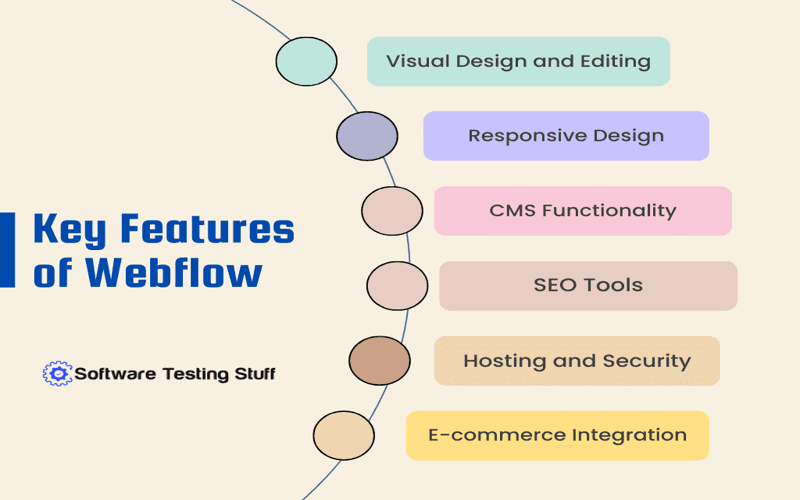
Webflow shines with its robust feature set, providing users with powerful tools that ensure excellent design outcomes. The ability to edit CSS, HTML, and JavaScript within a visual environment gives designers a unique competitive edge that is hard to replicate elsewhere. Moreover, the automatic hosting and built-in CMS capabilities streamline the workflow, making it a compelling choice for new site designs.
In contrast, Webflow’s pricing and learning curve can be a consideration for smaller businesses or individuals who may lack budgetary flexibility. Advanced animations and interactions present an enticing offer, yet the need for understanding the underlying code structure before effectively utilizing Webflow could be a deterrent for some. Design might take precedence, but only for those willing to invest in the learning process.
WordPress: The Giant in CMS Capabilities
For years, WordPress has dominated the CMS landscape, and its adaptability remains its strongest asset in 2025. While the platform started as a simple blogging tool, its evolution showcases an expansive ecosystem filled with themes and plugins that cater to almost any website need. This flexibility allows users to craft anything from a personal blog to a full-fledged e-commerce site. Thus, when compared to Webflow, the sheer volume of resources and community support makes WordPress an enticing proposition.
Nonetheless, the vastness of WordPress can make it a double-edged sword. The availability of countless themes may lead to decision paralysis for some users, while the need for regular updates introduces maintenance considerations that can overwhelm newcomers. For those looking to forge a unique path in web design, WordPress necessitates not only investment but also a degree of technical literacy that varies widely across users.
Ease of Use: Webflow Versus WordPress
When it comes to ease of use, opinions diverge. Webflow’s setup may initially intimidate new users due to its learning curve; however, once familiarized, its visual interface becomes a powerful ally in realizing design goals. Designers find that working in Webflow promotes creativity without the frustration of dealing with code directly. Yet, a solid understanding of design fundamentals is essential.
Conversely, WordPress offers a diverse entry point with its template-based approach and a plethora of user-friendly page builders, meaning that a novice can quickly set up a functional website. For users intending to delve deeper, however, the intricacies of PHP and theme customization can turn this simple interface into a challenging puzzle. Though approachable at first glance, WordPress demands more navigating through its extensive landscape as users’ ambitions scale.
SEO Capabilities Comparison: Who Comes Out on Top?
SEO remains a crucial factor in choosing a website builder, and here, Webflow makes compelling arguments with its clean code output and built-in SEO tools. With automatic sitemap generation and fast loading times, Webflow users can optimize their sites effectively without extensive technical SEO knowledge. Such attributes make Webflow particularly appealing for businesses prioritizing quick, efficient online visibility.
In contrast, WordPress boasts a vibrant ecosystem laden with established SEO plugins such as Yoast and Rank Math. This flexibility allows users granular control over their SEO practices, but it requires a deeper understanding of the site’s architecture. While Webflow may edge out in user-friendliness, WordPress’s capacity for detailed optimization options could tip the scales in its favor for more experienced marketers.
Considering Costs: Webflow’s Predictable Rates vs. WordPress’s Varied Expenses
Cost is often a key deciding factor between Webflow and WordPress. Webflow’s transparent pricing structure provides clarity, where users pay predictable fees for hosting and features. This might appeal to those hesitant about unexpected expenses or maintenance costs. However, the higher tiers required for full functionality can create a startling financial commitment.
On the other hand, WordPress operates on a freemium model that can be as budget-friendly or demanding as necessary based on user choices for themes, hosting, and plugins. This makes it possible for someone with minimal resources to create a site, yet the need for extras can quickly increase overall expenditure. Ultimately, each platform’s cost structure reflects broader user priorities and the balance between immediate affordability and long-term investment.

In conclusion, choosing between Webflow and WordPress ultimately boils down to understanding your specific needs and priorities as a web developer or content creator. Both platforms offer unique features and capabilities that cater to different user bases, making them suitable for various projects. Here are some key points to consider:
– **Webflow** is ideal for designers focused on visual precision and advanced interactivity, thanks to its visual editing tools and clean code output.
– **WordPress**, on the other hand, excels in content management flexibility, offering a vast array of themes and plugins, suited for content-heavy websites.
– Consider the learning curve: Webflow may be steeper for those unfamiliar with code, while WordPress can be accessible to beginners using pre-built themes.
– Ultimately, the choice boils down to whether you prioritize design control (Webflow) or content management (WordPress).
By carefully weighing these aspects, you can determine which platform aligns better with your vision for your website.
Ultimately, the debate over Webflow vs. WordPress highlights the importance of aligning a website platform with your goals, technical skills, and project needs. To summarize:
– **Choose Webflow** if you prioritize visual precision, need integrated hosting, and desire a managed environment where design aesthetics are paramount.
– **Opt for WordPress** if extensive customization, a vast plugin ecosystem, and budget flexibility are essential for your project.
– Both platforms have evolved over the years, offering improved features and easing the development process for users, thus narrowing the gap.
– Consider testing both platforms to find which resonates with your workflow and meets your website objectives more effectively.














