
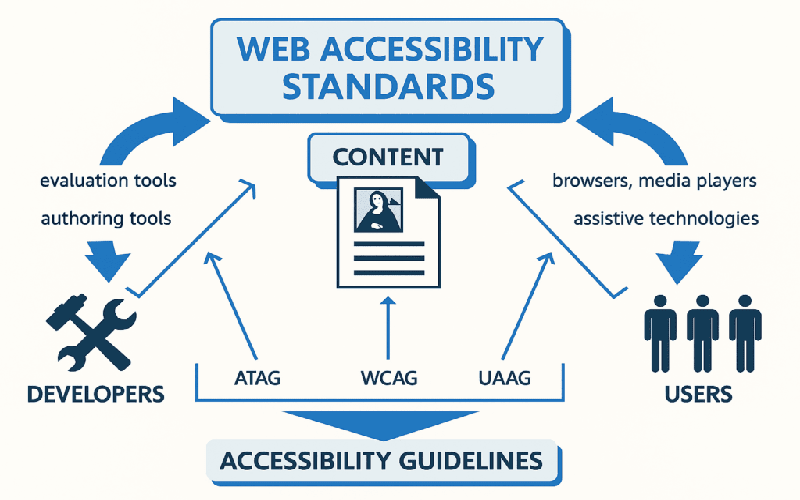
Imagine trying to navigate a bustling street, only to find that important signs are obscured or missed entirely—this experience mirrors what many users face when accessing websites that lack inclusive design. With approximately 15% of the global population living with disabilities, neglecting web accessibility isn’t just a design oversight; it’s a barrier that shuts out countless individuals from the digital landscape. Engaging in inclusive design principles isn’t merely about compliance with WCAG guidelines. It’s about understanding the diverse needs of users and creating a web experience that caters to all, fostering not only usability but also empathy and respect in our digital interactions.
Every choice you make while designing a website can either make it a welcoming space or an exclusionary maze for those with disabilities. For instance, consider the power of semantic HTML; it’s not just technical jargon—it’s the very essence of designing with empathy, helping screen readers transform visual content into an accessible narrative. Likewise, your approach to color schemes should extend beyond aesthetics; it’s about ensuring that the message remains clear and vibrant for users with visual impairments. Thus, as you shape your digital environments, reflect on the principles of UX for disabilities; each thoughtful decision can ignite a ripple effect of accessibility, ultimately enriching the online experience for everyone.
Key Elements of Web Accessibility
At the heart of web accessibility lies the understanding of diverse user needs. Designing with various disabilities in mind means acknowledging not just sight and hearing impairments, but also recognizing cognitive and motor challenges. A crucial aspect is to leverage semantic HTML, a practice that provides structure and clarity to your content while enhancing its machine readability. For example, using
Another often overlooked element is the significance of text alternatives for graphics and multimedia elements. When an image conveys a message or contains essential information, descriptive alt text becomes indispensable; it bridges the gap for screen reader users who cannot see the image. Always consider including a brief explanation that encapsulates the image’s purpose. This practice isn’t merely a checkbox but an essential layer of communication that enriches the user experience for all, not just those with disabilities.

Practical Tips for Inclusive Design
Inclusive design isn’t just about meeting compliance standards; it’s a creative process. For instance, consider color choices. Aim for high contrast between background and text using tools like the WCAG Contrast Checker. Clear color palettes prevent confusion for users with visual disabilities while also enhancing legibility for everyone—so it’s a win-win. Additionally, remember that relying solely on color to convey meaning can alienate users; supplement color with labels or patterns to ensure clarity for all audience members.
Moreover, the navigational experience should cater to all users. By ensuring keyboard accessibility, you empower those who cannot use a mouse to explore your website seamlessly. Implementing features like skip links and focusing on tab order can significantly enhance the usability of your site. By strategically placing links that jump to the main content, users can bypass repetitive elements, making their experience more fluid and engaging.
Essential Tools to Verify Accessibility
Building an accessible web design is not a ‘set it and forget it’ task; continuous validation is key. Leveraging tools like WAVE and Axe can give you insights into accessibility issues within your site. These tools scan your pages for potential barriers and offer actionable insights, so you can address them efficiently. Regular use of these resources can significantly reduce the risk of overlooking critical accessibility elements.
In addition, familiarize yourself with various screen readers, such as JAWS or NVDA, to understand firsthand how users with visual impairments experience your site. By navigating your own website using these tools, you can identify areas for improvement that may otherwise go unnoticed. It’s these small adjustments based on genuine feedback and testing that can make a massive difference in the inclusiveness of your digital offerings.

Frequently Asked Questions
What is web accessibility and why is it important for inclusive design?
Web accessibility refers to the design practices that enable people with disabilities to perceive, understand, navigate, and interact with the web. It is vital for inclusive design as it ensures that all users, regardless of their abilities, can access digital content and services. By implementing web accessibility principles, we create a more equitable online experience that enhances usability for everyone.
How can my website achieve WCAG compliance for better UX for disabilities?
To achieve WCAG compliance and improve UX for disabilities, follow the Web Content Accessibility Guidelines that focus on text alternatives, color contrast, keyboard navigation, and clear link descriptions. Ensuring that your website is built with semantic HTML and utilizes ARIA attributes appropriately will also aid in making your content more accessible. Testing with actual users with disabilities will provide valuable insights to help meet compliance and enhance overall user experience.
What tools can I use to improve digital accessibility for my website?
To improve digital accessibility, various tools are available such as screen readers like JAWS and NVDA for experiencing your site from a visually impaired user’s perspective. Accessibility testing tools such as WAVE, Axe, and Lighthouse identify potential issues, while color contrast analyzers ensure your text and background combinations meet accessibility standards. Utilizing these resources can guide you towards a more accessible and inclusive web design.
- Acknowledge the diversity of abilities; different disabilities require tailored web design strategies that cater to varied needs.
- Utilize semantic HTML to craft content with clarity; it establishes a meaningful structure that guides both users and search engines alike.
- Incorporate descriptive alternative text for images, ensuring that every visual narrative is accessible to screen reader users.
- Choose color palettes that not only please the eye but also ensure contrast, enhancing visibility for all users, including those with visual impairments.
- Facilitate seamless navigation through keyboard shortcuts; this opens doors for users who rely on non-mouse interfaces to explore your site fully.
- Craft links with intention, using clear and descriptive phrases so that the purpose of each link shines through, making navigation intuitive and informative.
- Provide captions and transcripts for media; this enriches accessibility and also expands your content’s reach to a wider audience.
- Implement ARIA attributes judiciously, enhancing the accessibility of dynamic elements without compromising the usability of native HTML features.
- Design with responsiveness in mind to ensure that all users, regardless of the device they choose, can interact with your site effortlessly.
- Engage in user testing with individuals who have disabilities; their insights reveal opportunities for improvement that enhance overall user experience.
- Commit to ongoing education in accessibility standards; the landscape evolves, and staying updated ensures your designs remain inclusive and effective.
Embrace the journey of crafting web designs that speak to the accessibility of every voice; explore related posts to deepen your understanding and refine your skills.














