

Creating a stunning CSS pie chart can elevate your web presentations and data visualizations. CSS pie charts are an innovative way to represent statistical information without relying heavily on JavaScript libraries. By utilizing simple HTML structures along with the power of CSS gradients, developers can create clean, customizable pie charts that maintain semantic value. This ensures that your HTML pie chart representation is not only visually appealing but also accessible, enhancing user experience for all. In this article, we’ll explore how to create pie charts using CSS, focusing on maintaining good practices that promote clarity and interaction.
When discussing circular data visualizations, terms like circular chart, donut chart, and segmented circle might come to mind. These visual tools serve a crucial role in summarizing information by showcasing proportional relationships within datasets. Pie charts, or their stylized variations such as colored segments and multi-layered representations, provide a quick visual reference for interpreting data distributions. By understanding the semantics of pie chart design and leveraging CSS techniques, you can create engaging, informative graphics. In the following sections, we will delve deeper into how to successfully implement these circular charts using just HTML and CSS.
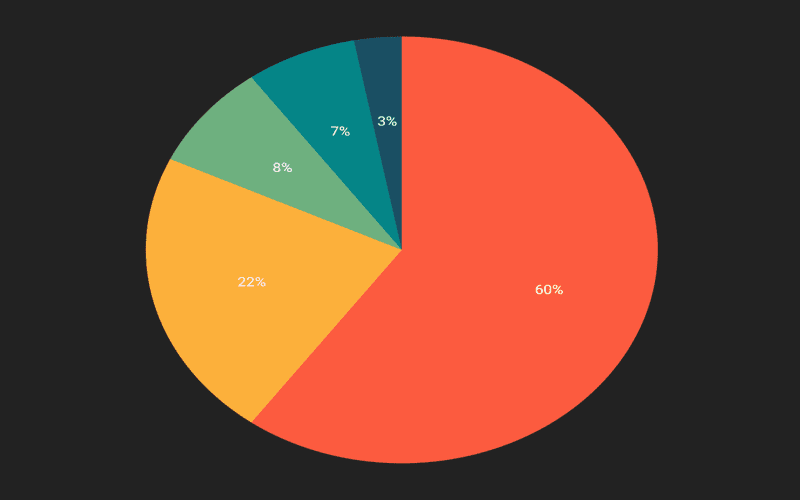
Introduction to Pie Charts
Pie charts have been a staple in data visualization, often used to represent proportions of a whole. However, their effectiveness can vary significantly based on design and implementation. As someone who’s navigated the world of presentations, I can attest to both the prevalence of pie charts and the common pitfalls they present. From my recent experience creating a webpage for a children’s charity, I realized how crucial it is to deliver charts that not only look good but also communicate information clearly.
The quest for the perfect pie chart involves more than just aesthetics; it’s about embedding meaningful data in a format that’s accessible to all. This article aims to guide you through the process of crafting a pie chart using CSS, fulfilling both visual appeal and semantic integrity. Let’s dive into the world of conic gradients and explore how to create pie charts that can stand on their own.
Setting Your Objectives
In our journey to create a pie chart in CSS, it’s essential to outline clear goals. First and foremost, the chart must be semantic; thus, it should convey meaning to screen readers, making it inclusive for all users. Secondly, we want a design that’s easily customizable through HTML alone. This means that any changes in data should only require altering the markup without diving back into the CSS. Finally, while we might still lean on JavaScript for some functionalities, the goal is to minimize its use. By establishing these priorities, we set ourselves up for a successful implementation.
Achieving this may seem daunting, but breaking it down into manageable tasks will streamline the process. We’ll be using conic gradients for the chart’s visuals, ensuring that they not only serve a decorative purpose but integrate seamlessly with the overarching objectives. If we succeed, the resulting pie chart will be both engaging and meaningful.
Understanding Conic Gradients
Before diving into code, let’s clarify what conic gradients are and their role in our pie chart creation. The conic-gradient() function in CSS offers a way to create circular gradients, which, on the surface, makes it appear as a simple method for generating pie charts. Yet, this approach fails to meet our semantic and customization goals. Using gradients alone strips the chart of its data-driven context, rendering it ineffective for accessibility.
Remember, a pie chart is more than a visual; it should tell a story about the data it represents. Therefore, while conic gradients can help us achieve the pie chart’s aesthetic, they shouldn’t be the sole technique relied upon. Our challenge lies in creatively incorporating them alongside well-structured HTML to delineate information accurately.
Enhancing Semantic Markup
To overcome the semantic issues tied to conic gradients, we need a robust markup that reflects our data’s essence. The proposed HTML structure is designed to facilitate the inclusion of essential information like percentages and labels. This enables screen readers to interpret and relay this information effectively to visually impaired users.
For instance, each slice of our pie chart corresponds to a list item with relevant data attributes, such as color coding and percentage values. This grants us the flexibility to alter the pie chart just by modifying the HTML, aligning perfectly with our customization goal. With this strategy, we lay the groundwork for a pie chart that is both visually appealing and understandable.
Crafting the Pie Chart
Now that we have our data organized, the next step is to convert this information into a visual pie chart. Each item in the list will be represented as a segment of the pie. Utilizing conic-gradient(), we can apply unique styling to each slice based on its percentage value, effectively providing a visual representation of the data.
This method not only keeps our design dynamic but also enforces our customization standard. As we delve into the CSS, we can implement a style that will allow the pie chart to be responsive while maintaining clarity and vibrancy in its depiction.
Positioning Labels Effectively
Labeling the pie chart correctly is vital for comprehension. Proper positioning of labels around the pie’s circumference ensures that viewers can easily associate the color-coded segments with meaningful titles. By calculating angles using CSS’s trigonometric functions, we can accurately place each label based on its corresponding data percentage.
It’s about creating a cohesive look and feel that guides the viewer’s eyes naturally across the chart. When done correctly, labels should enhance the overall understanding of the data rather than complicate it.
Concluding Thoughts
We’ve explored various facets of creating a semantic pie chart using CSS. We’ve touched on the importance of proper markup, the strategic use of conic gradients, and label positioning. While our current implementation is solid, there remains ample room for improvement. Whether it’s making input data dynamic or adding new features, the journey doesn’t end here!
This endeavor not only equips us with the tools for a well-designed pie chart but also sparks the creativity to explore beyond. What features would you consider implementing? The beauty of web development is that there are always new horizons to explore, making the ‘perfect pie chart’ a tantalizing pursuit.
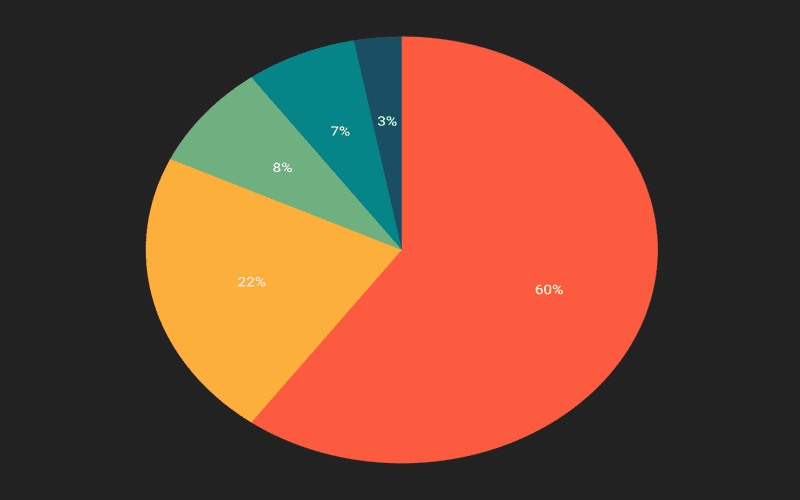
In conclusion, creating an ideal pie chart in CSS is an imaginative solution that balances functionality and accessibility. While we’ve made great strides by focusing on semantically rich markup and minimizing JavaScript usage, there remain areas for enhancement:
– We can explore automated calculations to dynamically generate percentages from raw data.
– Finding ways to automatically suggest or generate colors for slices could improve user experience.
– The possibility of expanding functionality to include various chart types, such as bar charts, will make our approach broader and more versatile.
By setting these ambitions, we open doors to further creativity in data representation on the web.
Ultimately, this journey towards crafting the perfect pie chart exemplifies the blend of art and technology that web development entails. We’ve tackled the essential elements that contribute to a well-structured pie chart while ensuring it remains visually engaging and accessible:
– Prioritizing semantic HTML allows our charts to convey information accurately to all users, including those using screen readers.
– Customizability through HTML ensures that updating data or modifying elements is straightforward and efficient.
– Keeping JavaScript to a minimum fosters a cleaner, more refined solution that champions CSS capabilities.
As we continue to refine our methods, let’s embrace feedback and experimentation, inspiring others to elevate data visualization standards through innovative CSS techniques.




